Account Progress
Details
An onboarding experience after signup to allow users to track what steps they should take to get the most out of their experience with Step.
Role
Impact
Product strategy
Visual design
UX Design
+ 31% KYC conversion
+ 24% MTU conversion
Context on post-signup onboarding
Prior to this project, post-signup onboarding consisted of a single cell on the Home Screen which had a linear progression of CTA's prompting users to complete certain tasks in order to set up their bank account.
The problems with this experience are highlighted below.

Process Outline
This project, as with every project, thoroughly follows a design process which is centered around user problems. Without a user centered design approach, the potential for innovation is lost completely!
Although this page does not highlight everything in this project's design process, here is an outline of everything we did.

Understand
User Insights
-
After signup, users lose track of what they should be doing next
-
Some onboarding steps post-signup can done at the same time rather than one after the other, but users cannot tell which steps they can do
Business Goals
-
Increase Identity verification conversion (KYC)
-
Increase first transaction conversion (MTU)
Decide
To improve KYC and MTU conversion, we will create a post-signup list of tasks that drive users to KYC, fund their account, activate their card, make their first purchase, along with other important tasks they users can do.
Goal Statement
There are many ways to design a list, and some lists are more effective than others depending on user needs. Here is a sample of the dozens of lofi mockups I created.
Prototype

This new feature allowed us to communicate to our users more effectively, and was built to be scaleable.
In an A/B test, "Onboarding Cell vs Account Progress":
-
21% increase in KYC conversion
-
12% increase in MTU conversion
This data tells us that it was successful in solving user pain points, guiding users to what they should be doing to reach their banking goals.
Account Progress was also built in a scaleable way. Other pods can implement lists of their own deeper in the user's lifecycle. For example, the team in charge of core banking features ended up creating a list to guide users to enable credit reporting within Account Progress.
Account Progress M1

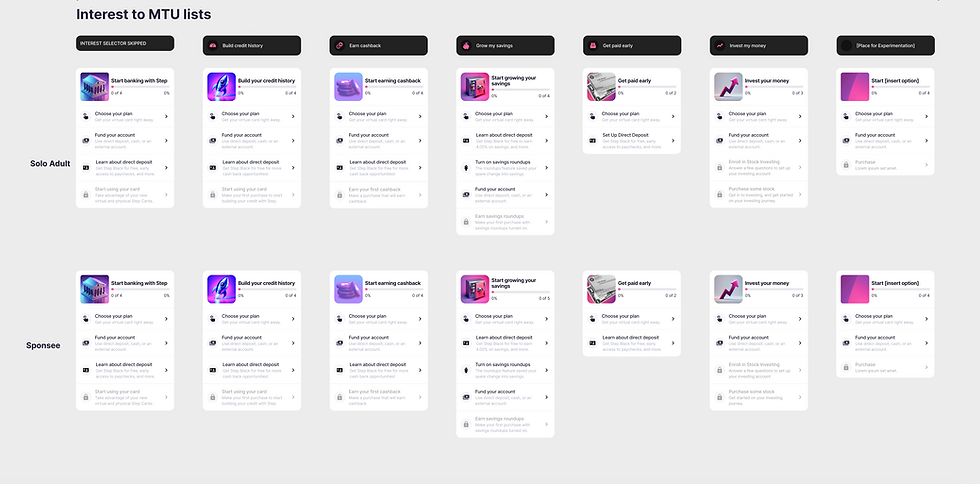
M2: Interest Based Lists
If onboarding is defined as the journey a user takes from the app store to the user’s first retention-related task, we need to know how to get them to that retention related task quickly.
We chose to base a user’s onboarding experience around each user’s top interest, and frame the steps within onboarding within the context of their top interest.
For example, when a user selects their top interest in signup, we prompt users to verify their identity within the context of that selection. “Start building credit today: Verify your identity to safely start building credit”. This change increased the identity verification (KYC) conversion.
Any important onboarding prompts beyond that are also put into a list in account progress within the context of their top interest.